
Interaction design involves designing the exchanges between users and products.
2025/10/27
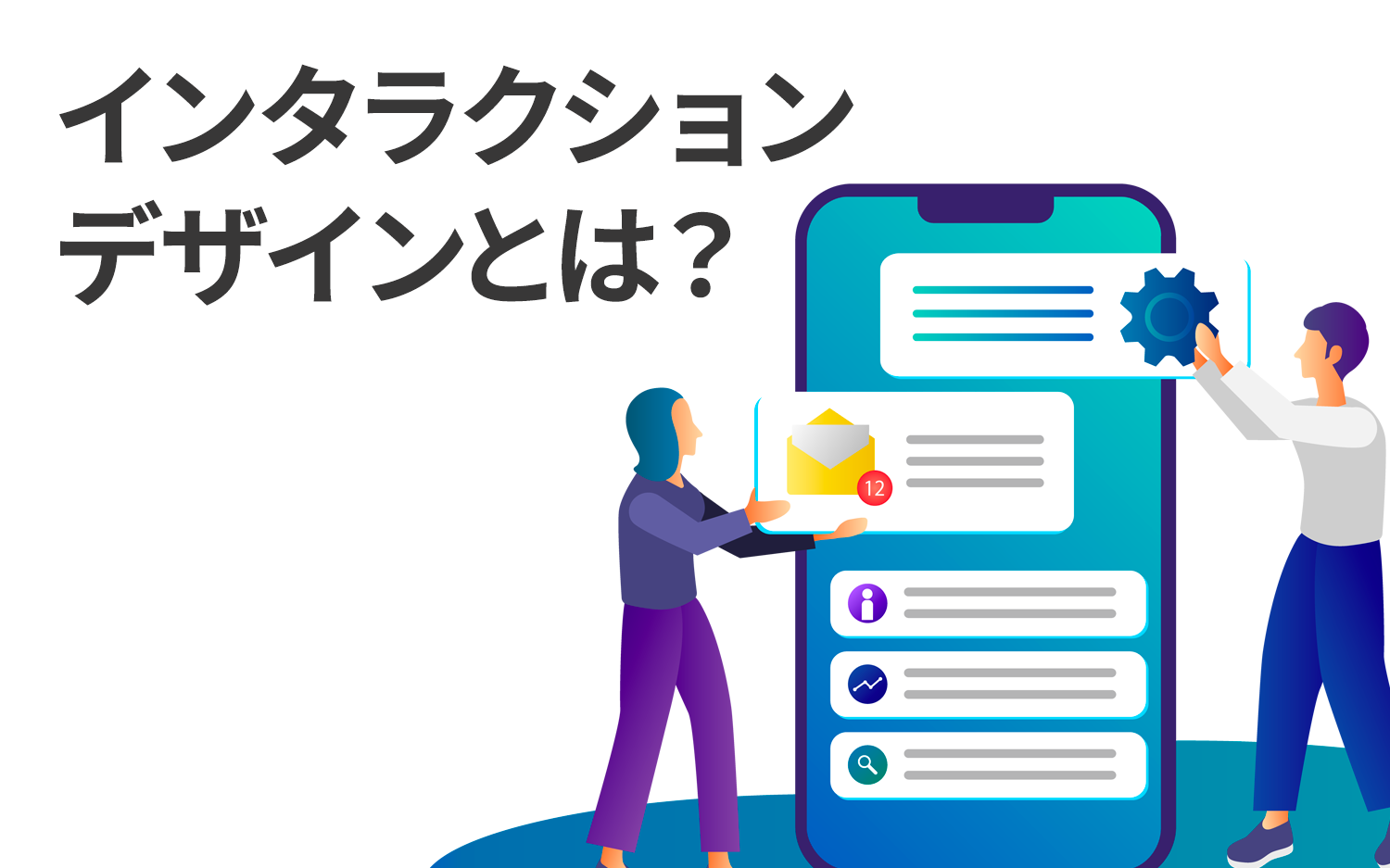
Interaction Design(IxD) refers toDesigning specific 'interactions' between users and digital products, systems, and services.The term 'interaction' here refers to the specific actions users take when operating a product or system (clicks, taps, inputs, etc.) and the responses the system provides to those actions (changes in the screen, displays of messages, sounds played, etc.).
The goal of interaction design is to enable users to operate products and systems effectively and efficiently. Therefore,It is necessary to design in a way that clarifies the operations required to achieve goals when users utilize products, systems, and services, and to prevent incorrect operations.
Recently, interaction design has been emphasized in a variety of product and service fields. In this article, we will introduce specific examples, discuss the context in which interaction design is valued, and go into detail about actual production processes.
Table of Contents
- 1 Representative success stories of interaction design “Apple products” “Nintendo Switch”
- 2 Examples of failures in interaction design.
- 3 The background of the importance of interaction design.
- 4 Five Principles of Interaction Design
- 5 The Four Processes of Interaction Design
- 6 Five Benefits of Interaction Design on Websites.
- 7 Conclusion
Representative Success Stories in Interaction Design: “Apple Products” and “Nintendo Switch”
First, we will introduce “Apple products” and the “Nintendo Switch” as concrete examples of interaction design.
Success story 1: Apple products
First, a representative success story in interaction design is Apple products. Apple’s unique, user-centered, simple, and intuitive design has been adopted not only in its own products but also in many other products.
When focusing on the interaction design of Apple products, two common points across the products are:
◆Points of Interaction Design in Apple Products
- keeping the design simple,Designed so that users can understand and operate it immediately.is being conducted
For operations:emphasizing visual and tactile feedback.And it provides users with a sense of security.
Now, let’s take three representative Apple products—iPhone, Mac, and Apple Watch—and explain their characteristics in terms of interaction design.
Feature ① iPhone Interface
The values surrounding mobile phones in Japan changed significantly with the emergence of the iPhone. Around the early 2000s, when the first iPhone was introduced, the domestically popular devices were feature phones, commonly known as 'garakei', and the few smartphones that existed typically used physical buttons or stylus pens.
However, the iPhone harnesses multi-touch technology,Touch panel interfaces that can be operated intuitively with fingers.was adopted.
instead of memorizing buttons like before,By allowing intuitive operation through gestures like swipe, tap, and pinch, users can learn more easily.Additionally, the responses to those operations, for example,Animations when icons are pressed and the smoothness of screen scrolling are well-developed.Thus, users felt a sense of ease of use.
This became a benchmark value for smartphones, leading others to adopt similar touch interfaces. In other words,The iPhone interface has fundamentally transformed UX as an outstanding interaction design, becoming an industry standard.
Feature ② Mac Dock
The 'Dock' is a standard feature of Mac OS, serving as a tool for launching, switching, and accessing applications displayed on the Mac desktop. Below is an actual display of the Dock on a MacBook desktop; please focus on the left side of the screen.
◆MacBook Dock
In this way,The app icons are displayed larger, and when the mouse cursor approaches, the size changes with an animation, allowing users to quickly see which apps are selectable.Users can also intuitively add or remove apps by dragging with the mouse.
this design leads tomade it possible for beginners to easily manage applications, enhancing the usability of Mac.
Feature 3: Apple Watch's Digital Crown
The Apple Watch features a controller called the 'Digital Crown,' shaped like a watch's crown. Since operating the small screen of the Apple Watch is challenging with just a traditional touchscreen, a rotary button named 'Digital Crown' has been adopted on the side of the watch. Please see below.
◆ Operation through the Apple Watch's digital crown.
In this way,By rotating the digital crown, scrolling and zooming are easily performed.It is.When actually turned, there is a clicking sensation that provides clear feedback to the user about the action.。
Even as a small device like a wristwatch, such ingenuity achieves smooth and intuitive operability, greatly enhancing the user experience.
In this way,Apple always considers the user's perspective, striving for designs that feel 'easy to use for anyone' and 'enjoyable' in all its products.As a result, Apple's interaction design has become attractive and user-friendly for many people, exerting significant influence on other companies' products as well.
Success story 2: Nintendo Switch
Alongside Apple products, a globally highly regarded example in terms of interaction design is Nintendo’s “Nintendo Switch.” Launched as a hybrid game console combining a home console and a handheld device, Nintendo Switch greatly expanded the value of the gaming experience through innovative interface design.
What is especially noteworthy is “an intuitive control system” and “a sense of unity with the physical device”.
◆Key points of interaction design in the Nintendo Switch
・The flexible control style made possible by Joy-Con (detaching, separating, and combining) gives the user experience greater variety and freedom
・Interactions that appeal to the senses of touch and sight, such as HD Rumble and the IR camera, enhance the sense of immersion with the game
・The UI has a simple design that anyone can use, accommodating a wide range of users from gaming beginners and children to older adults
From the perspective of interaction design, the dedicated controller “Joy-Con” plays a major role in this product. Below, we explain the features of Joy-Con.
Feature 1: Transformable interface using Joy-Con
The biggest feature of the Nintendo Switch is that the Joy-Con controllers, which are the controllers, can be detached from the console and transformed depending on the usage scenario. For example, the interface itself changes depending on the play style, such as “TV mode,” where you enjoy games on a large television screen, “handheld mode,” where you take the console with you and play, and “tabletop mode,” where you stand the console up on a table and detach the Joy-Con.
Also, by holding the Joy-Con horizontally, it becomes possible for two people to play on a single Switch; the fact that the hardware’s form factor is directly tied to the flexibility of the UX is a highly unique specification from the perspective of interaction design.
Feature 2: Designing tactile and visual feedback
The HD Rumble function built into the Joy-Con is different from ordinary vibration, realistically reproducing things like the movement of water droplets and the weight of a ball. In addition, features such as hand-gesture recognition using a motion IR camera mean that multiple feedback elements—visual, tactile, and motion-based—enhance immersion in gameplay.
In this way, the Nintendo Switch is a product that fuses the characteristics of a physical device with software-side UI/UX design at a high level, and it offers many insights as a successful example of interaction design.
Reference: Nintendo Switch Support Joy-Con (Nintendo Support)
Examples of failures in interaction design.
Here, we will also introduce examples of failures in interaction design. First, please see below.
◆ Example of 'canceling a cancellation.'
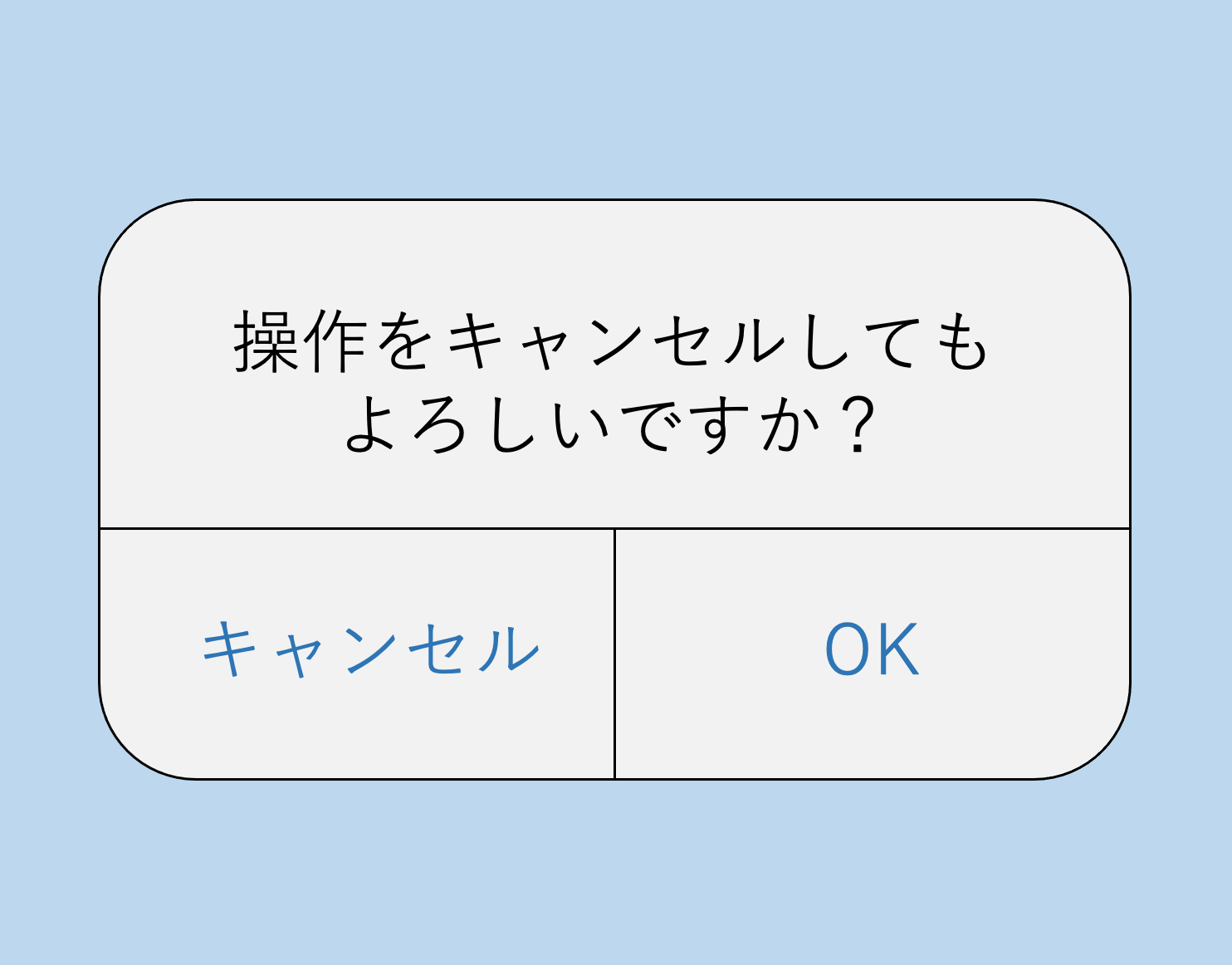
This isAn example often cited as a UI failure is referred to as 'cancellation of cancellation.'Indeed, some may have been confused when such dialogs appeared on their smartphones.
When paying attention to the 'cancel' button on the left, thisIt can confuse users when it is unclear whether to cancel 'the action to cancel' or 'the original action itself.'。
I myself have often been confused by such notifications, not knowing whether I had 'canceled an operation' or 'canceling the cancellation of an operation.' In this way,It becomes unclear what was canceled at which step, making it difficult for the user to comprehend the current state.That leads to.
As an improvement measure for this case, answering the question 'Are you sure you want to cancel this operation?' with options like 'No' and 'Yes' can help reduce user confusion.
In interaction design, as in this example,Neglecting to reconsider design from the user's perspective can complicate operations.must be noted out of caution.
The background of the importance of interaction design.
In the previous section, we introduced specific examples of interaction design using Apple products, and this kind of interaction design is increasingly being valued now.There is a demand for 'accessibility' and 'provision of reasonable accommodations' in various fields.This is an important background factor.
Accessibility refers to ensuring that all people, including those with disabilities and the elderly, can use products and services, while reasonable accommodations provide appropriate responses according to each user's needs.The principles of interaction design become crucial for achieving these.
Accessibility and reasonable accommodations through interaction design.
I will specifically explain the 'improvement of accessibility' and 'provision of reasonable accommodations' achieved by interaction design.
◆Improvement of Accessibility
Interaction design serves as the foundation for making products and services user-friendly for everyone.For instance, when visually impaired users browse a website using a screen reader, they can correctly understand the information if the interface is designed appropriately. This is part of accessibility measures, and awareness from the design stage allows forwe can create an environment that is accessible to everyone, regardless of disability.
Additionally, using appropriate labels on buttons and links, such as 'submit' or 'reserve', and adopting color schemes that are clear to users with color vision deficiencies are important elements to enhance accessibility in interaction design.
◆Provision of Reasonable Accommodations
By incorporating reasonable considerations into interaction design, individual users can utilize products and services in ways that suit them.For example, allowing text size to be freely changed on a website, providing subtitles for videos, or implementing interfaces that use voice recognition technology.Interaction design that caters to diverse users.By doing so, reasonable accommodations are realized.
The Act on the Elimination of Discrimination against Persons with Disabilities has been amended, and from April 2024,Provision of reasonable accommodations is mandated.has allowed forIn all fields such as products, services, and websites, it is required to provide fair and user-friendly experiences for all users.。
Due to such backgrounds, the importance of interaction design has increased, becoming not only about appearance but also aboutAn important element in creating an inclusive user experience accessible to everyone.is believed to be.
Reference: Reasonable Accommodation Leaflet (Cabinet Office)
Next, I will explain the production aspect of interaction design.
Five Principles of Interaction Design
Interaction design includesBasic guidelines for production.There are five principles for this. These are sometimes referred to as 'dimensions' in addition to 'principles.'
Five Principles of Interaction Design (5 Dimensions)
Principle 2: Visual Representations
Principle ③ Physical Objects or Space
Principal ④ Time
Principle ⑤ Behavior
I will explain each of these five points one by one.
Principle ① Words
Refers to the 'words' used between the user and the product or system, such as labels, button texts, navigation menus, and instructions. The choice of appropriate words isit significantly influences how users understand and interact with products and services.Using clear and understandable language allows users to achieve their goals without confusion.
Therefore, the terminology in interaction design isIt should be 'easy to understand for anyone, without complicated words or technical jargon' and 'convey appropriate meaning.'must be.
Principle 2: Visual Representations
These are visual elements such as icons, images, typography, or colors and layouts. Visual representations help organize information.It encourages users to understand operations and the context.This designIf it is visually appealing and intuitive, users will understand and operate it smoothly.
For instance, if the color scheme of an important button on a website differs from others, users can operate without mistake, and the three-dimensional aspect allows them to intuitively understand 'this is a button.'
Principle ③ Physical Objects or Space
It refers to physical devices used to operate mainly digital products, and interface elements that can be seen or touched on the screen. Typical examples include touch gestures on smartphone or tablet screens, mouse operations on computers, or VR headsets.
For example, to convey to users that a button on the screen is 'clickable', on a computer, this can be communicated by hovering the cursor over the button to give it some motion.In smartphones or tablets that do not use a mouse, or in VR headsets, it conveys that clicking is possible with visual information only.must be incorporated into the design.
In this way,Understanding device and physical constraints to create suitable design.enabling the provision of a user-friendly and effective experience.
Principal ④ Time
This refers to elements that change over time,Animations and transitions (scene changes), sounds, and other reactions to user actions.includes.
Specifically, this refers to animations like icons enlarging when opening an app on a smartphone or the smooth sliding and fading effects during page transitions. Other examples include loading bars or rotating images indicating 'loading' when a web page is being loaded and progress animations showing real-time updates during file uploads.
These elements areIndicates to users that operations are proceeding correctly, enhancing the user experience and improving usability and satisfaction.
Principle ⑤ Behavior
When users take an action, it responds to that actionHow the system responds and how it prompts the user to take actions.This represents. Here are some simple examples of 'behavior.'
◆ What happens when a button is pressed?
For example, when pressing a button in a smartphone app, if that button changes color briefly or the entire screen transitions to the next page,The action of 'the user pressing a button' and the response of 'the system changing color and switching the screen' are considered behaviors..
◆ Timing of notifications and messages.
In the case of a mail app where a notification pops up on the screen when a new email arrives,When a new email is received, the system informs that 'You have a new email' — this is the system's 'behavior'..
◆ Reactions that follow swipe and tap movements.
In a photo app, when swiping to switch to the next photo, if the photo moves smoothly in the direction the user swiped,The action of 'the user swiping' corresponds to the system's response of 'the photo moving smoothly' as 'behavior'..
SuchThe smoother and more natural the 'behavior' is, the easier it feels for the user, leading to a better experience.
The relationship between interaction design and UX (user experience).
Knowing the five principles of interaction design, some may understand it as 'essentially, interaction design is about UX.' However,Interaction design and UX are closely related, but they each have different aspects.
Interaction design is about designing the 'interactions' between users and products or services.This aims to consider how users interact with the product and how the system responds to those actions, creating smooth and intuitive interactions.
On the other hand,UX refers to the 'overall experience' that users feel while using a product or service.This includes user satisfaction, usability, feelings toward the product, and impressions of the brand, encompassing not only appearance and usability but all experiences from before users start using the product to after they finish.
◆ Relationship between interaction design and UX.
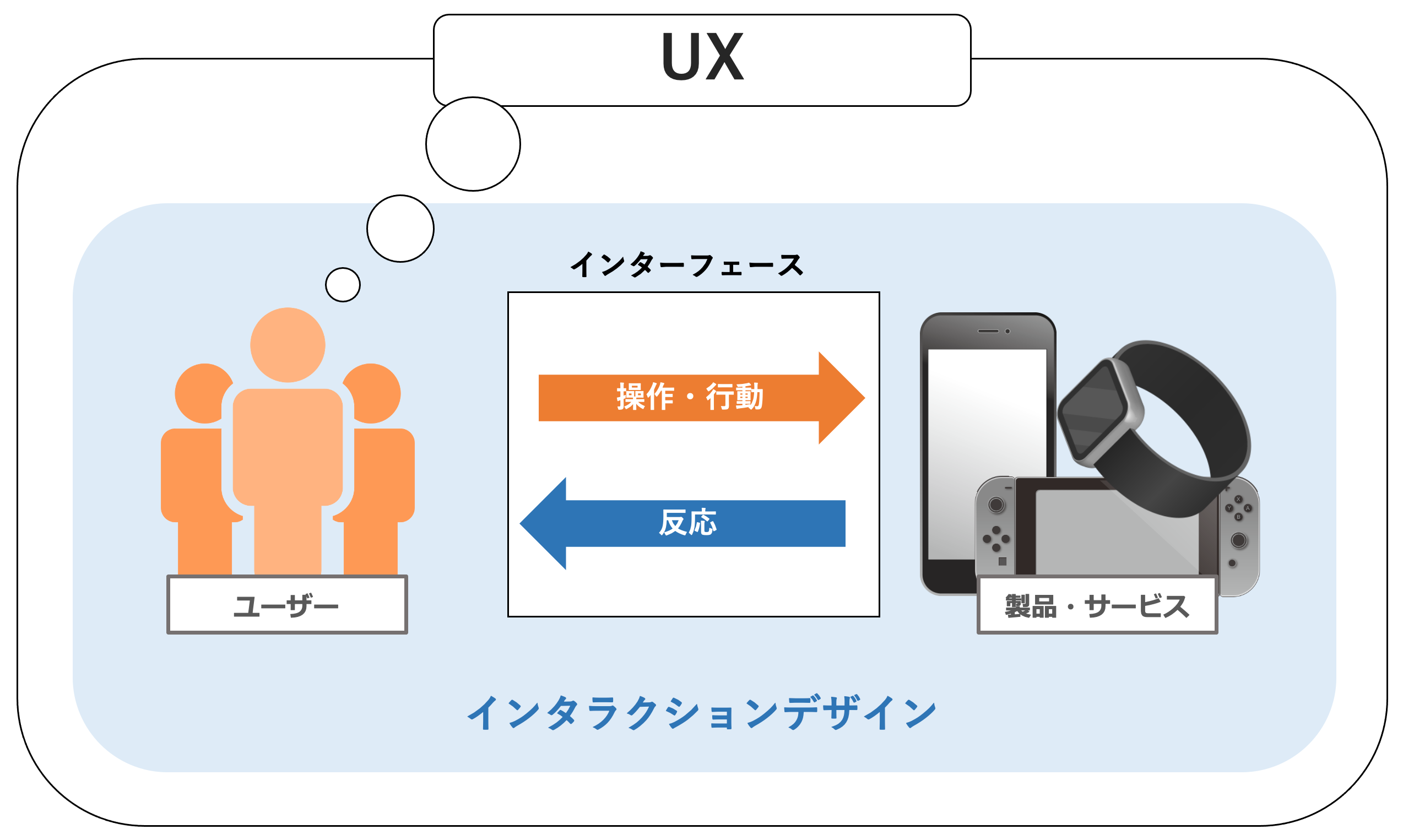
Thus, the interactions between users and products or services through the interface constitute interaction design, and the impressions and emotions felt by users through these interactions are what UX is all about.
This means thatInteraction design focuses on designing the 'instantaneous experience' when users operate a product, whereas UX designs the 'overall experience' that includes those operations.From this,Interaction design is a part of UX and is one of the key elements that make up the whole of UX.This can be considered as.
Now, I will explain the process of producing interaction design.
The Four Processes of Interaction Design
In creating interaction design, it can be broadly divided intoFour ProcessesIt can be divided into.
◆Interaction Design Process
Process 2 Idea generation: This is the stage of ideation to meet user needs.
Process 3 Prototyping: This is the prototyping stage where ideas can be tested in a tangible form.
Process 4 Testing and Improvement: This is the stage where users try it out and provide feedback for design improvement.
A detailed explanation of each process will follow.
Process ① Research
User needs and issues,The stage of clarifying issues related to interaction.This creates the foundation for the final design to meet user expectations and be user-friendly. Specific activities include:creating typical user personas based on user research, competitive analysis, and collected data.and more.
Process ② Idea generation
Based on the information obtained from research,This is a stage where we brainstorm ideas to address user needs and challenges, and think of concrete solutions.This allows for visualizing ideas,We will create the design framework by actually diagramming the screen layout and the structure of the interface.。
By visualizing the flow of operations that users perform when using products and services, we can organize what kind of interactions are necessary.This process solidifies the product concept.
Process ③ Prototyping
Regarding the interactions thought of during brainstorming,the stage of creating mockups and wireframes that allow users to interact and test.This involves creating prototypes that simulate the product's operation and interactions.
In prototyping,First, create simple sketches of the screen or interface using paper or a whiteboard. Next, use production tools to create a prototype that has interactions close to the actual product.This is the flow of the process.
Process ④ Testing and Improvement
Users actually use the prototype,The stage of verifying the effectiveness of interaction design and addressing issues.This process is repeated toOptimizing design.This is important.
By repeatedly carrying out these four processes,We can create interaction designs that are easy to use and attractive to users.
Five Benefits of Interaction Design on Websites.
While interaction design applies to various digital areas and physical products and services, here we will focus on websites and introduce five benefits of implementing interaction design.
Benefit ① Improvement of UX
By incorporating interaction design, users can intuitively understand how to use the website more easily. User-friendly interaction design isIt reduces user stress and enhances satisfaction when using the site.This allows for the appropriate language version of the page to be displayed when users search.increasing the likelihood of repeat visitors and fans.
Benefit 2: Enhancing User Engagement
Hover effects on buttons and animations that change with screen scrolling provide visual enjoyment for users and increase interest in the content. This leads toUsers tend to spend more time on the website.This leads to greater engagement with the content.
Additionally, intuitive interaction designusers can be effectively guided to the next action (such as purchasing products, inquiries, registrations, etc.)There are benefits.
Benefit ③ Improvement of conversion rates
Interaction design allows users to search for information smoothly,This increases the likelihood of users taking final actions such as purchasing products or making inquiries.For example, displaying real-time error messages when filling out forms reduces input mistakes and helps users reach completion smoothly.
High-quality interaction design naturally guides users to their intended pages or products,Reduces dropout rates and increases conversion rates.
Benefit 4: Enhancement of brand image and differentiation from competitors.
Smooth and refined interaction design provides users with‘This site is high quality and trustworthy.’This gives the impression that, as a result,Improves brand image and enables differentiation from competitors.Furthermore, interaction design that enables enjoyable operations makes it easier for users to feel a sense of familiarity with the brand.
Benefit ⑤ Improvement of web accessibility
Web accessibility means thatDesigns and considerations that make websites easy to use for everyone, regardless of disability.This means. By implementing interaction design on websites,Users with various disabilities such as visual, auditory, motor, and cognitive impairments find it easier to use websites., improves web accessibility.
By incorporating interaction design principles into the website, inclusive web experiences can be provided,allows for the construction of websites that can be accessed by more users.
As mentioned at the beginning, Apple incorporates interaction design not only in its products but also on its official website. The most iconic point is thatParallax design where the screen changes with scrolling.This allows users to enjoy the interaction with the website itself.The intended communication of information to users.It realizes this.
◆Apple Official Site (Apple Watch)
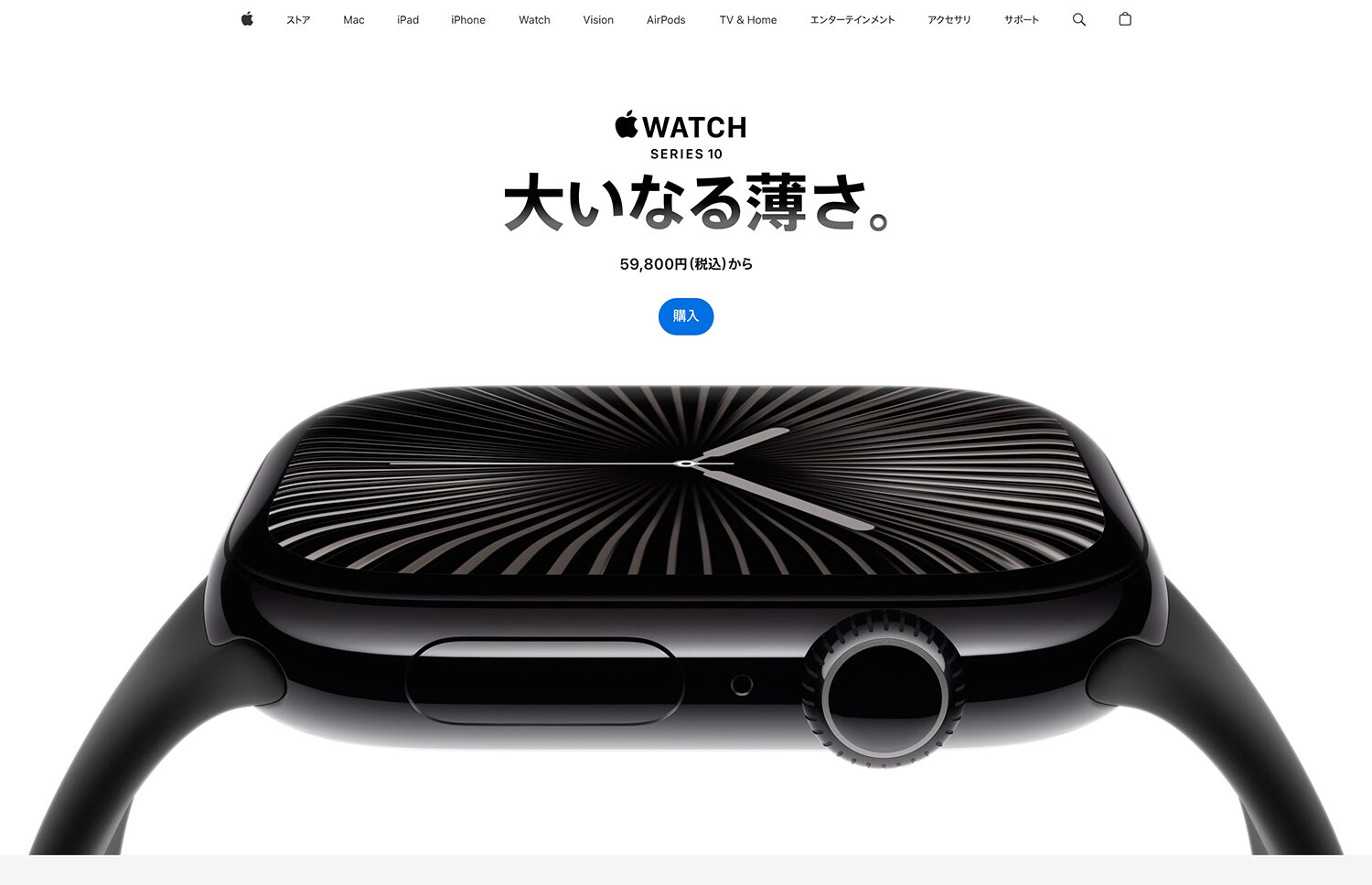
Reference: Apple Watch Series 10 (Apple)
Conclusion
Currently, the quality of user experience through products and services is emphasized in various fields, and there is a demand for reasonable considerations and improvements in accessibility for users with disabilities, leading to the increased importance of interaction design.
Interaction design is,It is a crucial factor in determining the usability of products and services, maximizing their value.therefore, it has become indispensable in modern digital products and services.
As mentioned in this article,Interaction design is also extremely important for websites, and it is necessary to ensure that all users can use the website comfortably and equally.This is. Our 'Uniweb' is a tool that easily implements accessibility functions on all websites,Enables the construction of sites where diverse users can comfortably utilize them.
If you want to incorporate interaction design into your company’s website, please feel free to contact Uniweb.
Popular Articles
-

Thorough illustrated explanation of 18 useful functions of AssistiveTouch
-
Explanation and examples of the "7 principles" for understanding universal design
-
13 types of "easy-to-read fonts" and 3 key points on how to choose one.
-
Four examples of sustainable tourism to create sustainable communities through tourism
-
Eight "screen sharing tools" for novice users to choose from.


-
Contact Us
-
Request Info
-
Free Trial
-
Partner System